Route traffic to a specific host and port through a tunnel with iptables rules
Recently, I had a task to configure Kubernetes authentication in Hashicorp Vault, which is outside of the Kubernetes cluster and has no direct access to the Kube-API. In this post, I'll describe how I achieved it.
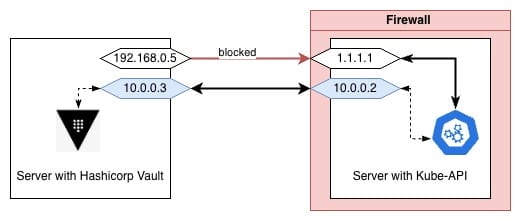
Access from Hashicorp Vault to Kube-API is crucial. It is required to check if the provided JWT is valid.
Vault access to Kube-API
The CA cert has only these names DNS:kubernetes, DNS:kubernetes.default, DNS:kubernetes.default.svc, DNS:kubernetes.default.svc.cluster.local, DNS:localhost, IP Address:10.100.0.1, IP Address:127.0.0.1, IP Address:1.1.1.1, so if we are querying 10.0.0.2:6443 we could not trust the connection. It is not possible to add 1.1.1.1 to AllowedIPs in the Wireguard config, because this is the endpoint of Wireguard itself. It is also not possible to whitelist the Vault server's IP, because it is behind a dynamic IP.
It could be possible to reissue CA or to reconfigure k3s to listen on a different interface, but IDK what issues I'll face after, and this is for sure an expected downtime.
The first step was the addition of routing on the server with Kube-API
#!/bin/bash

case $1 in
  start)
    iptables -t nat -A PREROUTING -i wg0 -p tcp --dport 6443 -d 10.0.0.2 -j DNAT --to-destination 1.1.1.1:6443
    iptables -t nat -A POSTROUTING -o eth0 -p tcp -d 1.1.1.1 --dport 6443 -j MASQUERADE
  ;;
  stop)
    iptables -t nat -D PREROUTING -i wg0 -p tcp --dport 6443 -d 10.0.0.2 -j DNAT --to-destination 1.1.1.1:6443
    iptables -t nat -D POSTROUTING -o eth0 -p tcp -d 1.1.1.1 --dport 6443 -j MASQUERADE
  ;;
  *)
  echo "Unknown value in first argument. Should be start or stop"
  ;;
esac
and a systemd unit to auto apply/remove these rules (created, enabled, started)
This allowed access Kube-API if the query was sent to https://10.0.0.2:6443. Still, Vault will not trust this connection, because 10.0.0.2 is not in the DNS names of the current CA cert.
The next step: Vault needs to send queries to 1.1.1.1:6433, but actually queries should be sent to 10.0.0.2:6433 instead. To achieve this, I've added the following script:
Recently, I had a task to configure Kubernetes authentication in Hashicorp Vault, which is outside of the Kubernetes cluster and has no direct access to the Kube-API. In this post, I'll describe how I achieved it.
I've started a migration of a bunch of makefiles to a binary to ease the process of local infra management
Here is the repo https://github.com/infra-lab-xyz/infra-lab-cli
I'm migrating my infra from the previous (docker-compose) into the current (k8s) infra.
All the previous posts were deleted since they are outdated
Upd: 15.02.2025